

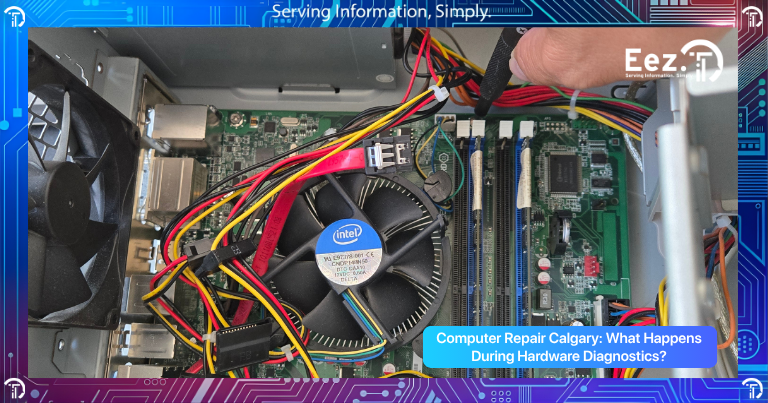
Many computer problems start with small warning signs that users often ignore. Slow performance, overheating, loud fan noise, freezing systems, startup failures, or random crashes may seem like simple software issues at first. However, these symptoms are often connected to failing hardware components inside the computer.
Before repairing or replacing parts, technicians perform hardware diagnostics to identify the exact cause of the problem. Professional diagnostics help determine whether the issue involves the processor, hard drive, SSD, memory, cooling system, motherboard, power supply, or other internal components.
This is one reason many users search for professional Computer Repair Calgary services when their systems become unstable or unreliable.
In this guide, we will explain what hardware diagnostics are, why they matter, common problems technicians look for, and how diagnostics help prevent larger computer failures.
What Are Hardware Diagnostics?
Hardware diagnostics are tests used to evaluate the health and performance of a computer’s internal components. These tests help technicians identify failing parts, overheating issues, damaged hardware, and hidden system problems.
Diagnostics are commonly performed on:
- Desktop computers
- Laptops
- Gaming PCs
- Office workstations
- Business systems
Professional hardware diagnostics help technicians accurately determine the root cause of a problem instead of guessing or replacing unnecessary parts.
This process is an important part of professional Computer Repair Calgary services because many computer issues can have multiple possible causes.
Why Are Hardware Diagnostics Important?
Many computer problems look similar on the surface. For example, slow performance could be caused by overheating, failing storage drives, malware, damaged memory, or aging hardware.
Without proper diagnostics:
- The wrong parts may be replaced
- Problems may return quickly
- Repair costs may increase
- Important hardware damage may go unnoticed
Diagnostics help technicians identify issues early before they become more serious or expensive.
Professional testing also helps prevent unnecessary repairs and improves overall repair accuracy.
What Problems Do Hardware Diagnostics Detect?
Professional hardware diagnostics can identify many hidden hardware and system issues that users may not notice immediately. In many cases, computers show small warning signs long before major failures happen. A system may seem slightly slower, louder, or hotter than normal, but the actual problem may already be affecting important internal components.
Diagnostics help technicians test the health, stability, and performance of different hardware parts to accurately identify the root cause of the issue instead of guessing.
Common problems found during diagnostics include:
- Overheating components
- Failing SSDs or hard drives
- Damaged memory (RAM)
- Power supply instability
- Cooling fan failure
- Motherboard problems
- Graphics card issues
- Processor overheating
- Dust buildup and airflow blockage
- Startup and boot failures
For example, a failing SSD may cause slow startup times and corrupted files, while damaged RAM can create random crashes and freezing problems. Overheating systems may slow down automatically to protect hardware from heat damage, especially when dust buildup blocks airflow inside the computer.
Many symptoms discussed in Computer Maintenance Guide articles are directly related to these hardware issues. Users often notice loud fan noise, unstable performance, internet interruptions, or startup problems before complete hardware failure occurs.
Identifying these problems early helps prevent larger system failures later. Professional diagnostics allow technicians to repair or replace damaged components before they cause permanent data loss, overheating damage, or expensive repairs.
Why Do Overheating Systems Need Diagnostics?
Overheating is one of the most common reasons computers become unstable, noisy, or slow over time. Modern computers generate a large amount of heat while running applications, gaming software, office programs, and background processes every day. To keep the system stable, cooling fans and airflow systems work continuously to remove that heat.
When internal temperatures rise too high, the computer starts struggling to perform properly. In many cases, users first notice the system becoming slower, louder, or unusually hot before more serious problems appear.
When internal temperatures rise:
- Performance decreases
- Systems freeze or crash
- Fans become louder
- Hardware lifespan shortens
- Random shutdowns may occur
Overheating can affect important hardware components such as the processor, graphics card, motherboard, SSD, and power supply. Many computers automatically reduce performance to protect themselves from heat damage, which is why overheated systems often feel slow and unstable.
Professional diagnostics help technicians measure temperatures, test cooling performance, and identify airflow problems inside the system. These tests help determine whether the issue is caused by failing cooling fans, blocked airflow, old thermal paste, heavy dust buildup, or damaged hardware components.
Many systems affected by Dust Damages Computers Over Time issues require internal cleaning and cooling maintenance during diagnostics. Dust buildup is one of the biggest causes of overheating because it blocks vents and prevents proper airflow inside the computer.
Overheating should never be ignored because long-term heat exposure can permanently damage important hardware components and lead to expensive repairs or complete system failure.
How Do Technicians Check Hard Drives and SSDs?
Storage devices are one of the most important parts tested during diagnostics because failing drives can lead to data loss and startup problems.
Technicians test for:
- Drive health status
- Corrupted sectors
- Read and write errors
- Performance degradation
- File system damage
Warning signs of failing drives often include:
- Slow file access
- Missing or corrupted files
- Startup failures
- Freezing systems
- Clicking sounds from hard drives
Professional diagnostics help determine whether the drive can still be repaired or if replacement is necessary.
Why Is RAM Testing Important?
RAM, also called memory, helps computers run applications and multitask smoothly.
Damaged or unstable RAM can cause:
- Blue screen errors
- Random crashes
- System freezing
- Failed startups
- Software instability
RAM problems are sometimes difficult for users to identify because the symptoms may appear inconsistent.
Hardware diagnostics help technicians isolate memory-related issues quickly and accurately.
Can Hardware Diagnostics Detect Fan and Cooling Problems?
Yes. Cooling systems are carefully tested during diagnostics because airflow problems commonly cause overheating and instability.
Technicians inspect:
- Cooling fan performance
- Airflow blockages
- Dust buildup
- Thermal paste condition
- CPU and GPU temperatures
Many users experiencing symptoms from Computer Is Making Noise problems discover that cooling fans are failing or clogged with dust.
Professional cleaning and cooling maintenance often improve both performance and system lifespan.
Why Are Diagnostics Important for Businesses?
Businesses rely heavily on stable computers and office systems every day. Hardware failures can interrupt productivity, delay communication, and create downtime across the office.
Professional diagnostics help businesses:
- Prevent unexpected downtime
- Protect important business data
- Improve system reliability
- Reduce repair costs
- Identify failing hardware early
Many companies that understand why Businesses Need IT Support invest in preventive maintenance and diagnostics before major failures happen.
Early testing helps businesses avoid expensive emergency repairs and lost productivity.
What Are the Warning Signs You Need Hardware Diagnostics?
Many computers show warning signs before complete hardware failure occurs.
Common warning signs include:
- Slow performance
- Loud fan noise
- Overheating systems
- Frequent crashes or freezing
- Startup problems
- Blue screen errors
- Random shutdowns
- Missing files or data corruption
- Internet instability
- Strange clicking or grinding sounds
If these problems continue happening regularly, professional diagnostics are strongly recommended.
Can You Run Diagnostics Yourself?
Some basic diagnostic tools are built into Windows and macOS systems.
Users can perform simple checks such as:
- Monitoring temperatures
- Checking storage space
- Running antivirus scans
- Updating drivers and software
- Testing internet stability
However, advanced diagnostics often require professional tools and experience to properly identify hidden hardware failures.
Incorrect testing or repairs may cause additional damage or data loss.
What Risks Come from Ignoring Hardware Problems?
Ignoring hardware issues can eventually lead to serious system failures and expensive repairs.
Risks include:
- Permanent data loss
- Hardware failure
- Reduced system lifespan
- Business downtime
- Security risks
- Unstable performance
- Increased repair costs
Many users wait until systems completely stop working before seeking help. Unfortunately, delayed repairs often make recovery more difficult and expensive.
Early diagnostics help reduce long-term risks and improve system reliability.
When Should You Contact Professional Computer Repair Calgary Experts?
You should contact professional technicians if:
- Your system overheats regularly
- The computer becomes unusually loud
- Startup problems appear
- Files become corrupted or inaccessible
- The computer crashes frequently
- Internet or network problems continue
- Performance suddenly drops
Professional Computer Repair Calgary services use advanced testing tools to identify the exact cause of hardware issues and recommend the correct repair solution.
How EEZIT Helps with Hardware Diagnostics in Calgary
EEZIT provides professional Computer Repair Calgary services for desktops, laptops, gaming PCs, and business systems.
EEZIT helps by providing:
- Full hardware diagnostics
- Cooling system testing
- SSD and hard drive testing
- Memory diagnostics
- Hardware troubleshooting
- Internal cleaning and maintenance
- Business workstation support
- Local IT support
EEZIT focuses on identifying the root cause of technical problems while helping users avoid larger hardware failures.
How Can You Prevent Hardware Problems?
Preventive maintenance greatly reduces the chances of major hardware failures.
Helpful prevention tips include:
- Keep systems clean and dust-free
- Monitor temperatures regularly
- Backup important files
- Update software and drivers
- Avoid overheating environments
- Replace aging hardware early
- Schedule regular maintenance checks
Regular diagnostics and maintenance help improve performance and extend the life of your computer.
Frequently Asked Questions
1. What are hardware diagnostics?
Hardware diagnostics are tests used to identify problems with internal computer components.
2. Why are diagnostics important before repairs?
Diagnostics help identify the exact cause of the issue and prevent unnecessary repairs.
3. Can diagnostics detect overheating problems?
Yes, diagnostic test temperatures, cooling systems, and airflow performance.
4. What hardware components are tested?
Technicians commonly test SSDs, hard drives, RAM, cooling systems, motherboards, and power supplies.
5. Can diagnostics help prevent data loss?
Yes, early testing can identify failing storage drives before complete failure occurs.
6. How long do diagnostics usually take?
Basic diagnostics may take a few hours, while complex systems may require longer testing.
7. Does EEZIT provide hardware diagnostics in Calgary?
Yes, EEZIT provides professional Computer Repair Calgary diagnostics and troubleshooting services.
Conclusion
Hardware diagnostics play an important role in identifying computer problems before they become major failures. Overheating, failing drives, unstable memory, cooling issues, and startup problems can all affect system performance and reliability over time.
Professional Computer Repair Calgary services help users accurately diagnose these problems, improve performance, and protect important data and hardware. Early diagnostics help reduce repair costs and keep systems running smoothly for longer.
Contact EEZIT Today
Contact EEZIT today for fast and reliable Computer Repair Calgary services, including hardware diagnostics, cooling maintenance, SSD testing, and professional computer troubleshooting.