

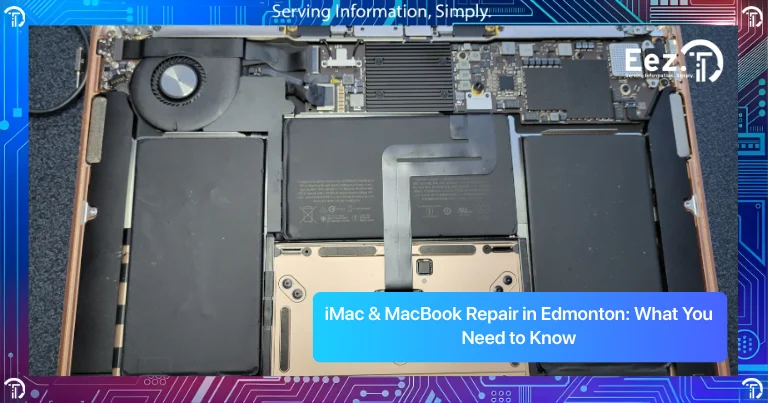
Apple computers like iMac and MacBook are known for their performance, design, and reliability. Many people use them for work, school, business, and creative tasks every day. However, like any computer, they can develop problems over time. Slow performance, battery issues, overheating, screen damage, or system errors are some of the most common issues users experience. When these problems appear, many people start searching for iMac & MacBook Repair in Edmonton to understand what is wrong and how to fix it.
Mac computers are different from regular Windows computers, and repairs often require specific tools and experience. Understanding common Mac problems, warning signs, and repair options can help you make better decisions and avoid expensive damage.
Common iMac and MacBook Problems Users Experience
iMacs and MacBooks are built to last, but regular use can still lead to problems over time. As the system gets older, parts can wear down, storage can fill up, and performance can start to drop. In some cases, the issue builds slowly. In others, it appears without much warning and interrupts your day right away.
Apple users often run into problems such as:
- Fast battery drain on MacBooks
- Slow system performance
- Excess heat or constantly running fans
- Flickering screens or blank displays
- Keyboard or trackpad issues
- Mac not powering on
- Apps closing unexpectedly
- Storage space warnings
- Wi-Fi or Bluetooth connection problems
- Charging issues or loose charging ports
These issues do not always mean the device has reached the end of its life. In many cases, they are early warning signs that your Mac needs maintenance or repair. A battery that drains quickly may need replacement, a slow system may need cleanup or upgrades, and overheating often points to internal dust or cooling issues. Fixing these problems early can improve performance, prevent bigger failures, and help your Mac last much longer.
What Causes Mac Problems Over Time?
Most Mac problems are caused by regular use, heat, aging components, or software issues. Even well-maintained Mac computers can develop issues after several years of use.
Common causes include:
- Battery wear after extended use
- Dust buildup causing overheating
- Full storage slowing down performance
- Outdated macOS or software conflicts
- Physical damage from drops or pressure
- Liquid spills damaging internal components
- Aging storage drives
- Cooling fan issues
- Charging cable or port damage
Understanding the cause of the problem is important before repairing the device. Proper diagnosis helps avoid unnecessary repairs and saves money.
Warning Signs Your Mac Needs Repair
Mac computers usually show warning signs before a major failure occurs. Many problems start as small performance issues, but if they are ignored, they can turn into serious hardware damage or data loss. Recognizing these signs early can help protect your files, improve performance, and prevent expensive repairs later.
Common warning signs include:
- Battery does not hold charge
- Computer runs very slow even after restart
- Mac overheats quickly
- Loud fan noise constantly
- Screen flickering or display lines
- MacBook not charging
- System freezes or crashes
- Applications not opening properly
- Strange noises from inside the computer
- Mac does not turn on
You may also notice that your Mac takes a long time to start, programs open slowly, or the system becomes hot even during normal use. These are clear signs that something is not working properly and the computer may need maintenance or repair.
If you notice these issues regularly, you may need macbook repair edmonton or imac repair edmonton services before the problem gets worse. Fixing the issue early can help extend the life of your Mac and keep it running smoothly.
Repair Solutions for iMac and MacBook Issues
Mac repair solutions depend on whether the problem is related to software or hardware. Some issues can be fixed quickly, while others require replacement parts.
Common Mac repair solutions include:
- Battery replacement
- Screen replacement
- Keyboard and trackpad repair
- SSD storage upgrades
- Data recovery
- Overheating and fan cleaning
- macOS reinstall and system optimization
- Logic board repair
- Charging port repair
- RAM or performance upgrades
Upgrading storage or replacing a battery can significantly improve Mac performance and extend the life of the computer.
Repair vs Replacement: What Is the Better Option?
Many Mac users wonder whether they should repair their device or replace it. In many cases, repairing or upgrading a Mac is more affordable than buying a new one.
You should consider repairing your Mac if:
- The battery needs replacement
- Storage is full and needs upgrade
- The screen is damaged
- The computer is still fast enough for your work
- The repair cost is reasonable
- The Mac is less than 6–7 years old
You should consider replacing your Mac if:
- The logic board is damaged
- Repair costs are very high
- The computer is very old
- Multiple components are failing
- The system is very slow even after upgrades
In many cases, SSD upgrades and battery replacement can make an older Mac feel much faster and extend its life for several more years.
Risks of Ignoring Mac Problems
Ignoring Mac problems can lead to more serious damage and higher repair costs. Small issues often turn into major hardware failures if they are not fixed early.
Risks of ignoring Mac issues include:
- Battery swelling damaging internal components
- Overheating damaging the logic board
- Storage drive failure causing data loss
- Screen damage spreading over time
- System crashes leading to file corruption
- Charging port damage preventing charging
- Slow performance getting worse over time
Fixing problems early can protect your data, improve performance, and reduce repair costs.
Professional iMac & MacBook Repair in Edmonton
Mac computers require proper diagnosis before repair because many problems appear similar but have different causes. Professional repair ensures the correct problem is identified and fixed safely.
EEZIT offers businesses, schools, and home users iMac and MacBook repair in Edmonton. Professional repair services help restore performance and extend the life of your Mac.
Professional Mac repair services usually include:
- Full diagnostics and troubleshooting
- Battery and screen replacement
- Storage upgrades and performance optimization
- Data recovery
- Overheating and fan repair
- macOS reinstall and system repair
- Logic board repair
- Charging port repair
Professional repair ensures the correct parts are used and the device is repaired safely. If you’re also looking for services in another city, you can explore our iMac & MacBook repair services in Calgary.
How to Prevent Mac Problems in the Future
Regular maintenance can help prevent many Mac problems and extend the life of your computer.
Here are some simple tips:
- Keep macOS updated
- Do not let storage become completely full
- Clean dust from vents regularly
- Avoid overheating by using your Mac on hard surfaces
- Backup important files regularly
- Use original chargers and accessories
- Do not ignore battery swelling or overheating
- Restart your Mac regularly
Preventive maintenance reduces the risk of major repairs and keeps your Mac running smoothly.
Frequently Asked Questions
1. How much does MacBook repair cost in Edmonton?
MacBook repair costs depend on the problem, such as battery replacement, screen repair, or storage upgrades.
2. How long does Mac repair take?
Most Mac repairs take a few hours to a few days depending on the issue and parts availability.
3. Is fixing an old MacBook worthwhile?
Yes, many older MacBooks can be improved with SSD upgrades and battery replacement at a lower cost than buying a new Mac.
4. Why is my MacBook overheating?
Overheating is usually caused by dust buildup, heavy applications, or cooling system issues.
5. Can I upgrade my iMac storage?
Yes, storage upgrades are possible and can significantly improve performance.
6. Do I need to backup my data before Mac repair?
Yes, backing up your data before repair is always recommended to prevent data loss.
7. Where can I find iMac & MacBook Repair in Edmonton?
You can contact EEZIT for professional Mac repair services and troubleshooting in Edmonton.
Conclusion
Mac computers are reliable and long-lasting devices, but they can still develop problems over time. Battery issues, overheating, slow performance, screen damage, and storage problems are some of the most common Mac issues users face.
Understanding the warning signs, performing basic maintenance, and seeking professional repair when needed can help extend the life of your Mac and prevent expensive repairs. In many cases, repairing or upgrading a Mac is more affordable than replacing it.
If your Mac is running slow, overheating, or not working properly, professional repair can help restore performance and keep your device running smoothly.
Contact EEZIT Today
Contact EEZIT today for prompt and dependable iMac and MacBook Repair in Edmonton and receive expert local assistance to keep your Apple devices operating effectively.